
- Table of Content
- Uploading pictures to your blog (1)
- Uploading pictures to your blog (2)
- Uploading pictures to your blog (3)
- Posting pictures from your mobile phone
- Using the flickr badge
- Using Japanese on a Windows XP PC
- Using Japanese on a Mac
- First, create a flickr account.
 Click on the flickr button
  on the bottom of the left navigation bar of the Nacos Nagaya home page. You can also click on the pictures below it.
 The flickr home page will open.Click on the words Sign up! to create your account.
 The following screen will open.If you don’t already have a Yahoo! account, you will need to create one. To do this, click on the words sign up.
- Fill in the required fields on the registration form.You can choose your ID and password.
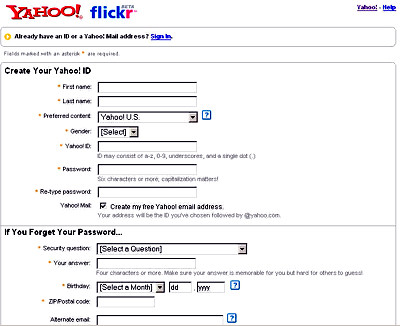
- Once you have registered, you are able to log in to the flickr web site.Click on the words, Sign in, and enter your Yahoo! ID and password.
- Your personal flickr page will open. At first glance, the options might seem bewildering but, once you try it, it is really very simple to use.
Next, please read “Uploading pictures to your blog (2)“.
- Table of Contents
- Uploading pictures to your blog (1)
- Uploading pictures to your blog (2)
- Uploading pictures to your blog (3)
- Posting pictures from your mobile phone
- Using the flickr badge
- Uploading pictures to your blog (1)

 ChanomiTalk